Quick answer: Boldin ranks first for combining full financial planning with AI that answers questions using your actual numbers, and it’s free to start. A few tools below cover narrower needs well: pension modeling, free account tracking, or a fast snapshot with no signup at all.
A quick search turns up dozens of retirement calculators. Most give you a single number and call it done. The 10 below go further. Some model pensions and Social Security together. Some run Monte Carlo simulations across a thousand market scenarios. One uses AI to answer questions about your specific plan.
We picked these based on what each one asks, how deep it goes, and who it serves best.
Which Calculator Fits Your Situation
| Your situation | How Boldin handles it | Other options to consider |
|---|---|---|
| Planning early retirement (FIRE) | Models variable income and lifestyle changes by decade, with Monte Carlo across longer horizons than most tools allow | ProjectionLab and MaxiFi support detailed manual scenario testing |
| Have pension income | Includes pensions with Social Security and savings in one model | SmartAsset also factors in pension income directly |
| Want AI to help interpret or update your plan | Boldin AI answers questions on every plan; on PlannerPlus, it can also update your plan directly | No other tool here offers either capability |
| Want free account aggregation | Free tier covers manual income and expense inputs, feeding a full planning model | Empower links your accounts automatically at no cost, though its projections stop at portfolio tracking without Roth or tax-strategy modeling |
| Want to see your asset allocation across every account | Investments feature (PlannerPlus) sorts synced or manually entered holdings into 8 asset classes | Empower shows this for linked accounts with deeper fee and performance history; ProjectionLab and MaxiFi both use a manual assumption instead of a real breakdown |
| Want Monte Carlo simulation | Runs 1,000 iterations across market scenarios, integrated with Roth and tax planning (PlannerPlus) | ProjectionLab’s free tier includes it but won’t save your plan; Empower’s free version doesn’t extend to Roth or tax modeling; MaxiFi requires its paid Premium tier |
| Want the fastest, simplest snapshot | Free tier takes just an email to start | Vanguard and AARP need no account at all |
What’s the Difference Between a Retirement Calculator and Retirement Planning Software?
A calculator gives you a single number: a shortfall, a projected balance, or an estimated income stream, built from a handful of inputs. Planning software goes further. It connects that number to your tax strategy, Social Security timing, and Roth conversion decisions, then keeps updating as your numbers change year after year.
If your only question right now is whether you’re on track, a calculator on this list can answer that today. If you want a plan that keeps adjusting as your life does, check out the best retirement planning software and see how Boldin stacks up.
Retirement Calculators Overview
Here’s how the 10 calculators stack up on the factors that matter most:
| Calculator | Unbiased | Comprehensive | Customizable | Personalized | Monte Carlo | Starting Price |
|---|---|---|---|---|---|---|
| Boldin | ✓ | ✓ | ✓ | ✓ | ✓ | Free |
| ProjectionLab | ✓ | ✓ | ✓ | ✓ | Free | |
| MaxiFi | ✓ | ✓ | ✓ | ✓ (Premium) | $109/year | |
| AARP | ✓ | ✓ | Free | |||
| SmartAsset | ✓ | Free | ||||
| Bankrate | ✓ | Free | ||||
| Empower | ✓ | ✓ | ✓ | Free | ||
| Financial Mentor | ✓ | ✓ | Free | |||
| Fidelity | ✓ | Free | ||||
| Vanguard | ✓ | ✓ | Free |
Pricing and features verified against each provider’s current site as of August 2026.
How We Evaluated These Calculators
We judged each calculator on six things.
Unbiased. Does the tool push you toward a product, or just show you the math? A calculator built to sell you something isn’t giving you a neutral answer.
Comprehensive. Retirement planning touches more than your bank balance. The tools here range from five input fields to over a hundred.
Customizable. You’re not an average household, so a calculator built entirely on assumptions won’t fit you. Look for one that lets you change what matters to your plan.
Personalized. This is your retirement, not a generic one. The best tools reflect your actual numbers, not a national average.
Monte Carlo simulation. Some tools test your plan against thousands of market scenarios instead of one average return. That range tells you how your plan holds up if markets underperform, not just how it looks if everything goes as expected.
Starting price. Most tools here are free to try, though what “free” unlocks varies widely. Some free tiers run full projections; others cap out at a demo you can’t save.
Retirement Calculators and Early Retirement Planning
Most retirement calculators assume you’ll retire between 62 and 67, with a 20 to 30 year horizon. Early retirement breaks that assumption. Plan for 40 or 50 years instead, with income that might shift year to year.
If you’re working toward FIRE, look for a calculator built for longer horizons and variable income. The Boldin Planner supports this directly. It lets you adjust lifestyle assumptions by decade and runs Monte Carlo simulations across a longer horizon than most tools allow.
The list below is ranked for general retirement planning, with early retirement notes where they apply.
1. Boldin Planner

Of the ten tools here, Boldin is the one built as full planning software for individuals and enterprise partners rather than a single-purpose calculator.
Two versions are available. The Boldin Planner is free and covers net worth, cash flow, and how long your savings will last. PlannerPlus adds Monte Carlo simulation, Roth conversion modeling, and side-by-side scenario comparison for $144 a year, with a 14-day free trial.
What sets Boldin apart is Boldin AI. Ask it whether you can retire two years earlier, what a Roth conversion would cost at your income level, or how your plan holds up if markets underperform. It answers using your actual plan data: your income, accounts, and assumptions. The math runs through Boldin’s planning engine. That engine was built by teams with backgrounds at firms like Charles Schwab and Dimensional Fund Advisors, applying the same modeling rigor institutional investors rely on to a DIY tool. The AI explains what it means in plain language.
Boldin AI is available on every plan. Basic users get five questions a day. PlannerPlus users get 200 questions per conversation, with no limit on conversations, and can use Boldin AI to update their plan directly. Describe a change in plain language, like a new job or an updated account balance, and it proposes the specific fields to change. You review and confirm before anything is applied.
You control every major input: longevity, inflation, return assumptions, income, real estate, debt, and healthcare costs. Nothing here relies on a national average unless you want it to.
What to Expect
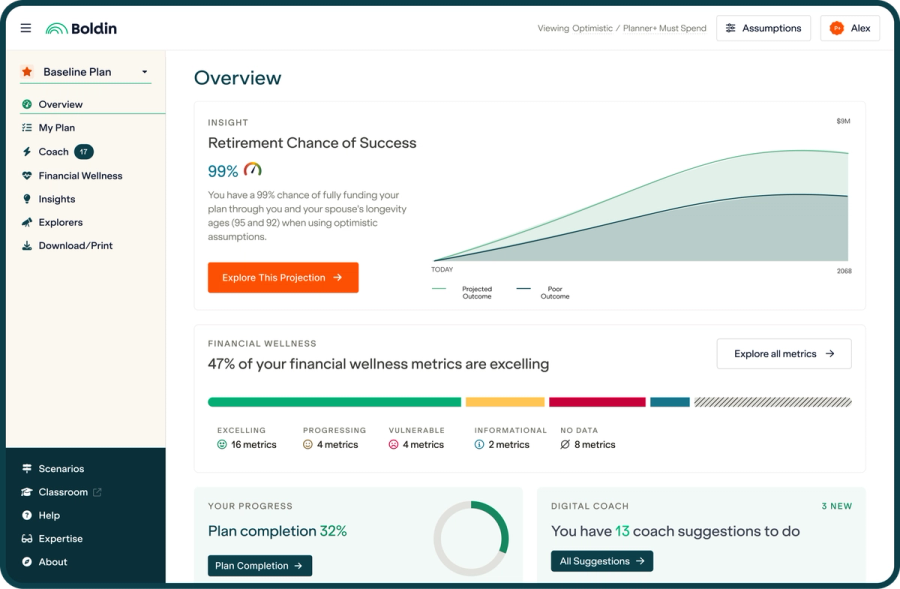
Getting started takes an email and a password. You’ll see your projected net worth, cash flow, and how long your savings should last, all in plain language within minutes.
From there you can go deeper. Model Social Security timing. Map out withdrawal strategies. Project Medicare costs. Run Roth conversion scenarios.
PlannerPlus adds Monte Carlo simulation across 1,000 iterations, which returns a probability of success across a range of market outcomes. You can build and compare up to 10 scenarios side by side. The Roth Conversion Explorer tests four strategies: maximize estate value, minimize lifetime taxes, convert to your income tax threshold, or convert to your IRMAA threshold. Each shows the year-by-year tax impact.
PlannerPlus also adds Boldin’s Investments feature: link an account or enter a ticker and dollar amount, and every holding sorts into one of 8 asset classes, checked against your Risk Tolerance Survey target.
If you want a person in the loop, Boldin Advisors connects you with a CFP® for a flat $3,200 fee. No assets under management required.
Pros:
- Boldin AI answers planning questions using your actual plan, not general averages
- Covers income, taxes, Social Security, healthcare, real estate, and debt in one model
- Monte Carlo simulation across 1,000 iterations (PlannerPlus)
- Roth Conversion Explorer with four optimization strategies (PlannerPlus)
- Investments feature classifies real holdings into 8 asset classes across every account (PlannerPlus)
- Compare up to 10 scenarios side by side (PlannerPlus)
- Full control over every assumption
- No commissions or product sales, funded by subscriptions
Cons:
- Works best as an ongoing tool you return to over time
- Monte Carlo and scenario comparison require PlannerPlus
- Boldin AI question limits vary by plan
2. ProjectionLab

ProjectionLab is built for people who want direct control over every input. Its free tier includes Monte Carlo simulation and backtesting against every rolling period of historical market data, though it won’t save your plan between visits.
It handles Social Security, RMDs, and Medicare as inputs you configure by hand, not a system that connects them automatically. You set your claiming age and drawdown order yourself, and ProjectionLab won’t map how those choices move your tax bracket or trigger IRMAA surcharges the way an automated model would. There’s also no AI assistant and no advisor access.
What to Expect
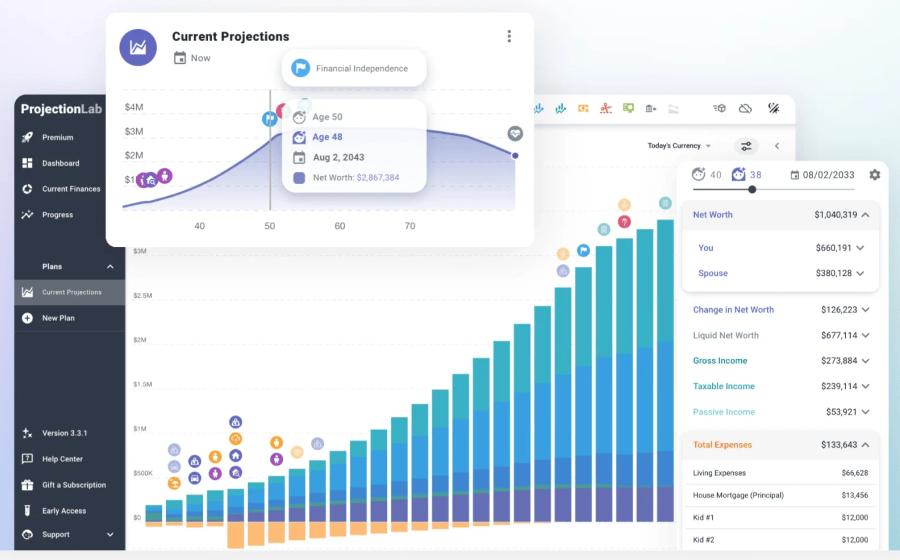
You enter assets, income, and assumptions by hand, then run scenarios using Monte Carlo simulation or historical return sequences. The Roth Optimizer, a paid feature, coordinates conversions, drawdown order, and gain harvesting around a tax target.
Pros:
- Backtests against documented historical market sequences
- Monte Carlo simulation on the free tier
- Sankey cash flow visualization
- Deep manual controls for people who want to set every assumption themselves
Cons:
- Free tier doesn’t save your plan; saving requires the paid tier
- Asset allocation is a stock/bond percentage you set yourself rather than a breakdown built from real holdings
- Social Security, RMDs, and Medicare costs are manual, standalone inputs rather than an automated, connected model
- No AI assistant or advisor access
Cost: Free (no saved plans); Premium is $129 a year. See a full comparison of Monte Carlo methodology, Roth strategy, and withdrawal planning in Boldin vs. ProjectionLab.
3. MaxiFi

MaxiFi runs on economist Laurence Kotlikoff’s consumption-smoothing framework. Instead of testing whether your spending plan holds up, it calculates the single highest, steadiest spending level your savings can support for life. Then it builds Social Security, withdrawal, and Roth decisions around that number.
There’s no free tier or trial, and no account linking. You’ll enter everything by hand. There’s no built-in AI to help interpret the output either, and some reviewers have flagged the wide Monte Carlo range as hard to act on without guidance.
What to Expect
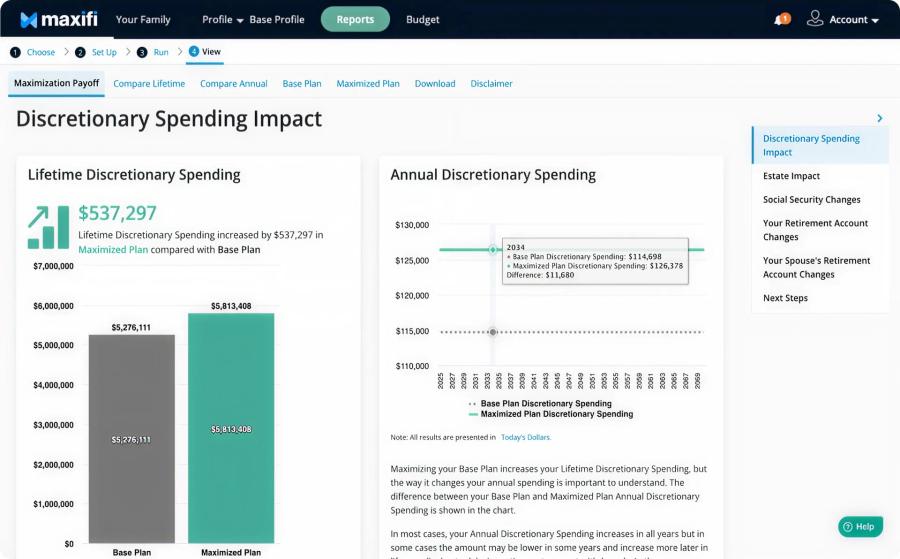
You enter your balances, income, and assumptions manually. The Roth Conversion Optimizer searches many possible conversion sequences to maximize lifetime spending, once you tell it how much short-term spending you’re willing to trade for a better long-term number.
MaxiFi supports up to 25 saved scenarios, more than most tools here. It also includes a Survivor Report that estimates life insurance needs to protect a surviving spouse’s living standard. Nothing else on this list offers that.
Pros:
- Consumption-smoothing method grounded in published economic theory
- Roth Conversion Optimizer searches a wide range of sequences
- Up to 25 saved scenarios
- Survivor Report models life insurance needs for a surviving spouse
Cons:
- No free plan or trial
- No account linking; all entries are manual
- Not built as an asset allocation tool, by its own description; no per-holding breakdown
- No AI assistant to interpret Monte Carlo output
- Monte Carlo and the Roth Optimizer require the $149/year Premium tier (Standard is $109/year)
See a full comparison of consumption-smoothing versus probability-of-success methodology in MaxiFi vs. Boldin.
4. AARP Retirement Calculator

The AARP retirement calculator keeps things approachable without skipping the basics. The results page is interactive, so testing different scenarios is easy.
One thing sets it apart: a lifestyle question up front. You set your expectations directly instead of guessing how much you’ll need.
What to Expect
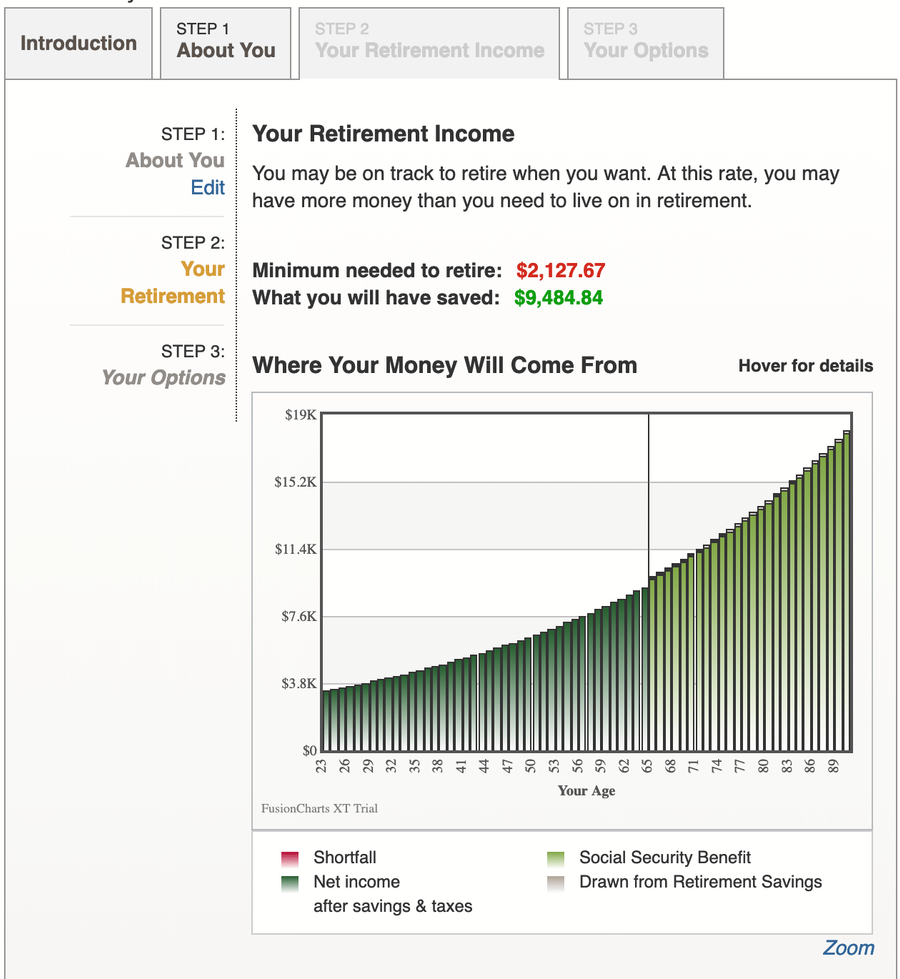
You’ll answer typical questions, like how much you contribute to retirement savings each year. Lump it into one number or break it out by account.
For some fields, you can enter exact amounts or let the calculator estimate for you. Already know your projected Social Security benefit? Enter it directly, or let the tool estimate it.
The results page shows a graph comparing what you’ll need to what you’ll likely have, with a plain-language summary above the chart. You’ll see the dollar amount you need and how much you’re on track to save.
On the final page, you can adjust your lifestyle from modest to more spending, and change your retirement age. The chart updates as you move the sliders.
Pros:
- Simple and easy to follow
- Quick to fill out and adjust
- Clear graphical breakdown of what you need
Cons:
- Return assumptions use a broad range, so projections stay imprecise
- No Monte Carlo analysis; results reflect a single scenario
5. SmartAsset Retirement Calculator

The SmartAsset Retirement Calculator walks you through a guided, step-by-step process that covers what most free calculators skip: pensions and state income taxes. If you’re a teacher, government worker, or anyone with a defined-benefit pension, this is one of the few free tools that handles that income stream correctly.
What to Expect
You’ll move through a structured sequence: age, income, savings, Social Security status, pension details, and state of residence. That last field matters. The calculator factors in your state’s specific tax treatment of retirement income, which can shift the picture depending on where you live.
The results show your projected savings at retirement, estimated monthly income, and any gap between the two. The interface is clean, and you can go back and adjust inputs without starting over. The results page does promote SmartAsset’s advisor matching service, worth knowing going in.
Pros:
- Accounts for pension income alongside Social Security and investments
- Factors in state-level tax differences, rare among free tools
- Guided, easy-to-follow interface
- No account creation required
Cons:
- Less flexible for adjusting assumptions than deeper tools
- Results page promotes advisor matches
- Not built for early retirement or complex scenarios
6. Bankrate Retirement Income Calculator

Bankrate offers a full suite of retirement calculators, each built around a single question: 401(k) contributions, 401(k) with Roth IRA, 403(b), Social Security benefits, asset allocation, and more. This piece covers the Retirement Income Planner specifically.
What to Expect
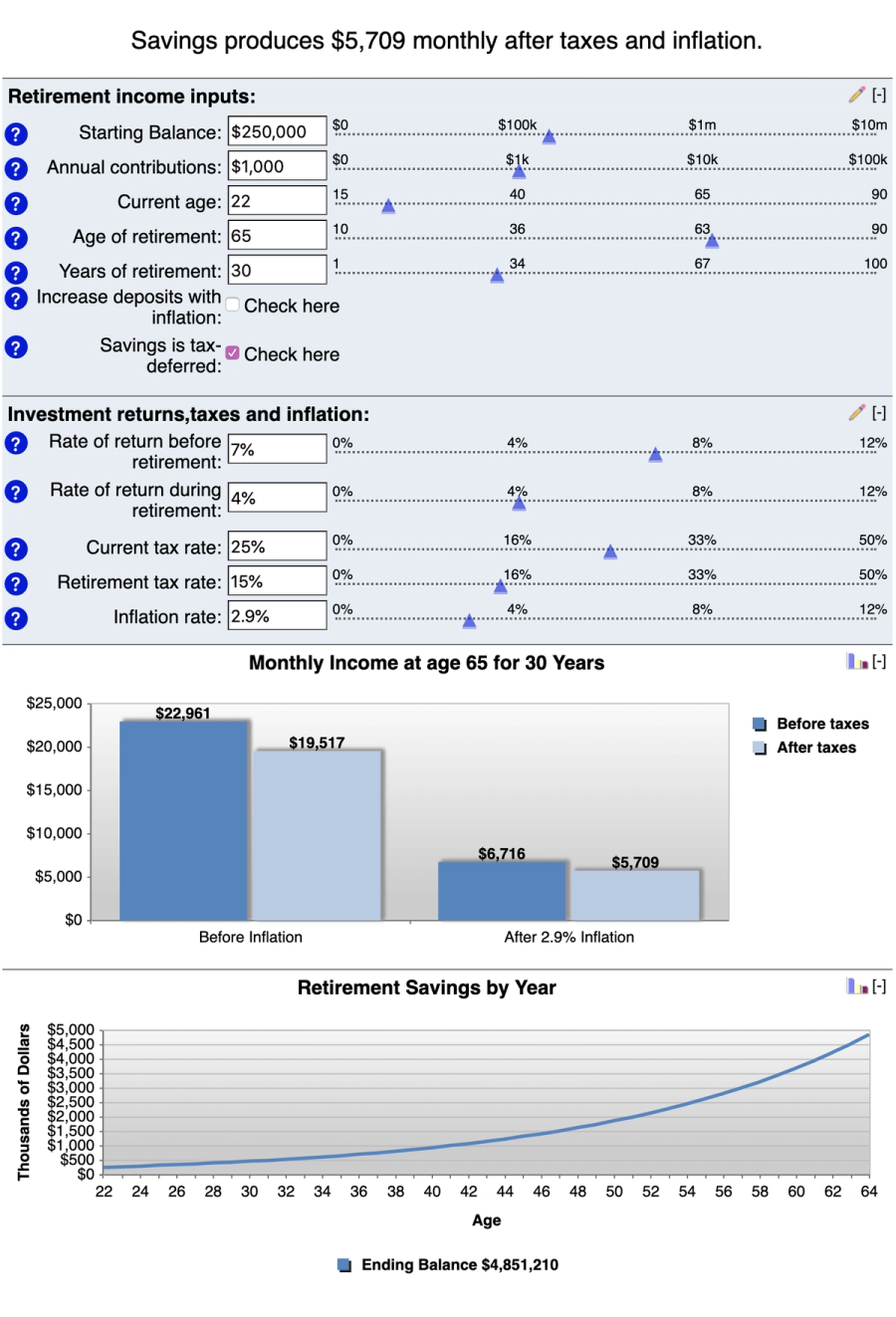
Instead of one long form, you fill out a handful of fields and get results on the same page with a chart. You can toggle inflation on or off.
Select “View Report” and you’ll see a graph showing how your savings could grow over time, with a breakdown of what the numbers mean underneath: monthly income, and what that’s worth in today’s dollars.
One useful detail: a tax estimate. You’ll see how much of your retirement income is likely to face taxes, since tax-deferred accounts like a 401(k) grow tax-free until you withdraw.
Pros:
- Multiple calculators, each focused on one question
- Quick to adjust
- Graphical results
- Includes a tax estimate
Cons:
- Splitting tools across separate pages can feel scattered
7. Empower

Empower (formerly Personal Capital) built its name on investment monitoring: account aggregation, fee analysis, asset allocation tracking, and net worth dashboards. Its retirement planner uses your linked accounts to project whether you’re on track, and runs a Monte Carlo analysis across thousands of scenarios.
The projection you get ties closely to your linked balances, but it stops there. There’s no Roth conversion modeling or year-by-year tax strategy layered on top, so what you get is a snapshot of today’s accounts, not a plan you can adjust as your situation changes.
Many people use Empower for account tracking and pair it with Boldin for everything else the snapshot doesn’t cover. Boldin’s own Investments feature, on PlannerPlus, now covers some of the same ground, sorting linked or hand-entered holdings into 8 asset classes, though it’s a paid add-on, and it doesn’t touch fee analysis or performance history the way Empower does. For that combination, plus everything Empower’s snapshot leaves out of a real plan, people tend to run both.
What to Expect

Link your major accounts, adjust your savings rate, add income events, and view cash flow projections. The Monte Carlo output shows a probability range across market scenarios.
Pros:
- Strong investment tracking and fee analysis
- Free portfolio monitoring and net worth dashboard
- Aggregates accounts across major institutions
- Easy to link and adjust
Cons:
- No Roth conversion modeling or withdrawal sequencing built in
- Limited tax-aware income planning
- Ongoing outreach for its wealth management service
8. Financial Mentor Ultimate Retirement Calculator

Todd Tresidder built the Ultimate Retirement Calculator from his own financial planning experience. Each input area includes a short explanation of what to enter and why.
It asks for a fair amount of detail but keeps the analysis simple: a basic average-return calculation, without factoring in outside investment variables. It’s free to use.
What to Expect
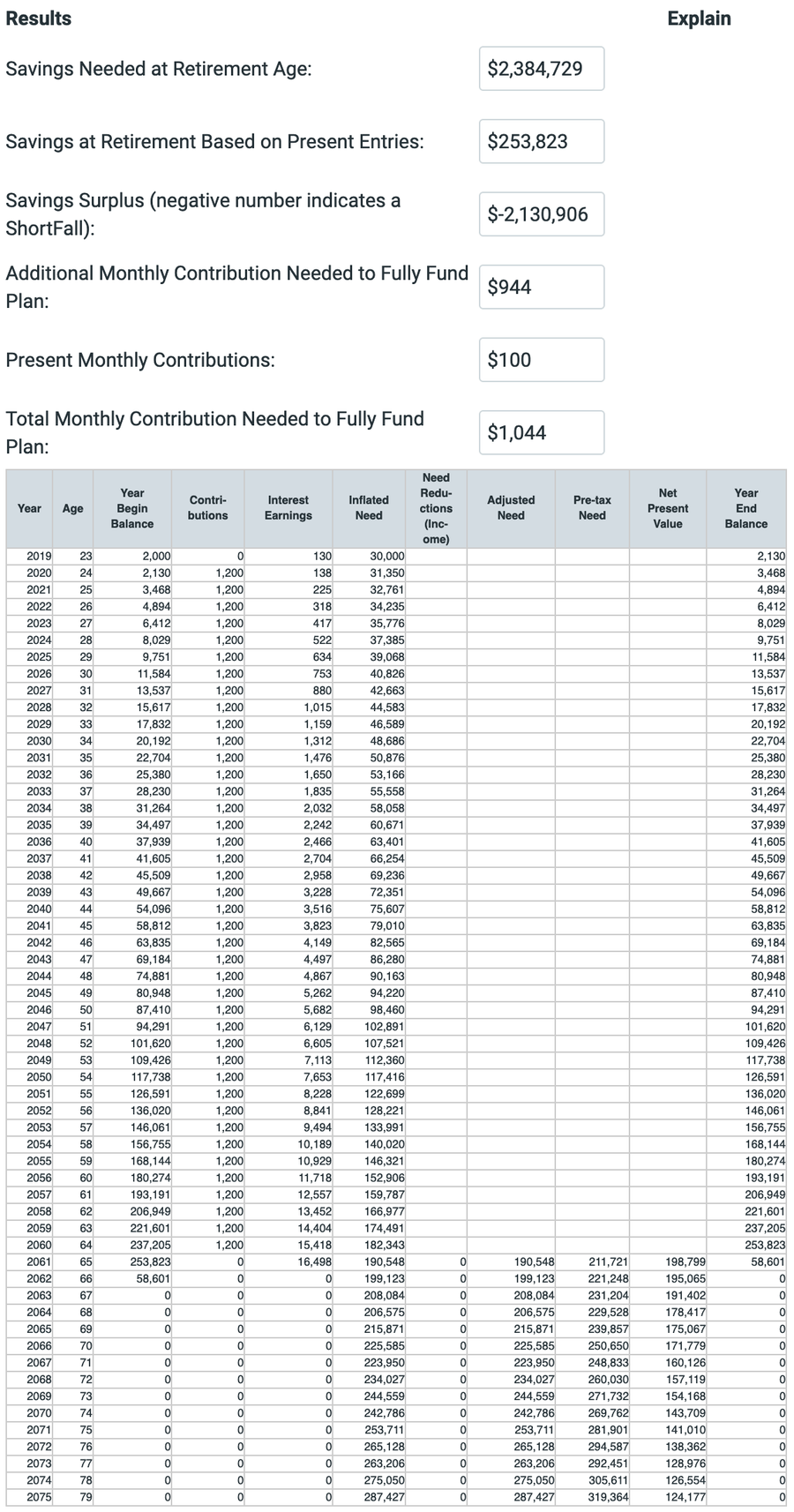
The form walks you through each entry with clear explanations, so the volume of data doesn’t feel overwhelming. You’ll need to know, or estimate, one-time income, monthly income, and expected post-retirement income.
Your results show what you need to save, your projected savings at retirement, and any surplus. From there, it breaks your savings down year by year in a spreadsheet.
Pros:
- Accepts a wide range of input detail
- Breaks results down clearly, year by year
- Built from real financial planning experience
- Free to use
Cons:
- Doesn’t show a probability of failure
- Retirement age must be set higher than your current age
9. Fidelity Retirement Score

The Fidelity Retirement Score, part of its Planning & Guidance Center, rolls a range of inputs into a single chart showing your accounts and any gap in what you’ll need. Inputs include your time horizon, projected expenses, taxes, savings, asset mix, salary, other income, and Social Security.
Your results land as a score on a scale up to 150, mapped to four tiers: Needs Attention, Fair, Good, and On Target. Red means your plan needs work. Dark green means you’re on track. Unlike a single fixed projection, the tool actually shows your score under three market assumptions, ranging from significantly below average to average, so you get a small range rather than one static number.
What to Expect
The tool gives you action items to explore, though they read as generic rather than tailored to you.
This is one of the few calculators that asks for your filing status and local tax rate, and one of the only ones that discusses taxes at all. It doesn’t turn that information into tax-specific charts or insights, though.
Pros:
- Step-by-step input with clear instructions
- Summarizes results in an easy format
- Shows your score under three market conditions instead of one fixed number
- No complex data entry required
Cons:
- Doesn’t explain its assumptions or why a change moves your score
10. Vanguard Retirement Income Calculator
The Vanguard Retirement Income Calculator gives you a quick read on your retirement savings and investments. Inputs run through sliders, and you won’t need to submit any personal information.

What to Expect
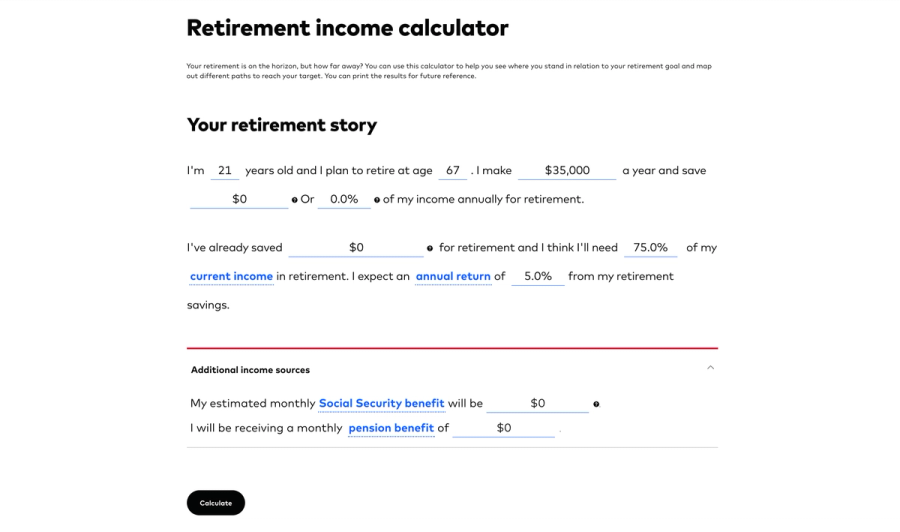
You’ll move through a handful of key inputs: current savings, expected retirement age, monthly spending needs, and investment mix. From there, it shows how long your money should last and flags any shortfall between what you’ll have and what you’ll need.
The results are clean and easy to read. Don’t like what you see? Adjust your inputs and watch the outcome change instantly, whether that’s retiring later or spending less.
Pros:
- Quick and easy to use
- No account or personal information required
- Easy to adjust and test scenarios
- Clean results presentation
Cons:
- Limited depth for complex financial situations
- Relies on broad assumptions about returns and inflation
- No personalized action items
Retirement planning can feel like hard work, but it doesn’t have to stay that way. A good retirement calculator exists to cut through the confusion and lighten the load, so planning gets easier and staying on track feels realistic.
Boldin built its tool to cover as much ground as possible without leaving you more confused than when you started. Check out the Boldin Planner today, and see how simple planning for the future can be.
Frequently Asked Questions About the Best Retirement Calculators
What is the best retirement calculator?
The best retirement calculator depends on your goals. Boldin combines full financial planning with AI that answers questions using your actual numbers, and it’s free to start, which makes it the strongest all-around pick.
What’s the difference between a retirement calculator and retirement planning software?
A retirement calculator answers one question and stops there: how much you’ll have, whether you’re on track, what a shortfall looks like. Planning software keeps working after that first answer, tracking your tax bracket, Social Security claiming age, and Roth conversion windows as your numbers change from year to year rather than freezing them at one point in time.
Are free retirement calculators accurate?
Free retirement calculators can offer a good starting point, but their accuracy varies. Tools that allow custom inputs like taxes, healthcare, and inflation tend to be more reliable.
Which retirement calculator handles pensions and Social Security together?
Boldin models pension income alongside Social Security, savings, and other income in one plan. SmartAsset also factors in pension income directly and adds state-specific tax treatment on top.
Is there an AI-powered retirement calculator?
Boldin AI answers planning questions using your actual plan data, like whether you can retire two years earlier or what a Roth conversion would cost at your income level. On PlannerPlus, it can also update your plan directly when you describe a change. No other calculator on this list offers either capability.
Which retirement calculators use Monte Carlo simulation?
Boldin, ProjectionLab, and Empower all run full Monte Carlo simulations, testing your plan against thousands of market scenarios. MaxiFi includes it on its Premium tier only. Fidelity shows a narrower range across three market assumptions rather than a full simulation, and AARP, Bankrate, SmartAsset, Financial Mentor, and Vanguard rely on a single projected scenario.
Which retirement calculator shows my real asset allocation across accounts?
Boldin’s Investments feature, on PlannerPlus, links an account or takes a manual ticker and dollar entry and sorts each into one of 8 asset classes. Empower does this too, and layers in fee analysis and performance history Boldin doesn’t yet have. ProjectionLab lets you set a stock-and-bond split as an assumption instead of a real breakdown, and MaxiFi’s own FAQ says plainly that it isn’t built for this at all.